Posts

I Have Just Experienced The Power Of Chatter

I just have experienced the power of chatter. Its amazing when people can get addressed when they have problems, isn't it? and its free user license with a limit of 5500 users of course, which is not minimum and can be increased. It took some simple configurations to make it simple. I created a user with License "Chatter External" and profile "Chatter ExternalUser" while that account is being set up, I created a private group "Cusomer Group 1" allowing customers to interact. The user could log in with a different browser, While a CSR is looking for some open Cases in Cusomer Group 1. Now its just the Social media.... Salesforce group has then become a facebook page or something. And the conversation smoothly went on just like expected. Just wanted to share this. What a way to provide service. Go Force Go HTH Prabhan

Salesforce.com Vs Force.com Licenses

Image
Salesforce has recently announced its new force.com pricing list. Click  here  for the notification. The prices look so tempting, don't they? But wait... That licenses wont give you CRM, what they give u is a platform to build your own app (could be your own crm, but think about building it from the scratch, Brahma), though it is great for those who have CRM implemented with SFDC and have a need to provide some users access to only some apps. there are cases. SFDC is only providing horizontals, like CC, Sales, Marketing. It is not providing an ERP solution, but giving u force.com to build your logic. Before going into an example, let us understand what do these different licenses mean ... as given in "sf.pdf" Salesforce Designed for users who require full access to standard CRM and   Force.com   AppExchange   apps. Users with this user license are entitled to access any standard or custom app. Each license provides additional storage...

FieldSets in Tables

One small tip, but very useful. This is common requirement but I didn't find any post anywhere, so I thought of putting it together. FieldSet is a magical concept which lets the admins take control on visibility of fields on Visualforce. "It doesn't take a developer to add/ remove the fields on visualforce pages" Step 1: Create a fieldset, Select your fields in pagelayout Editor. I grabbed Account name, Site, Description into my set " testfieldset ". Step 2: Create a visualforce page with following code and understand . <apex:page id="pg" standardcontroller="Account" recordSetVar="accts"> <apex:form id="frm1">     <apex:pageBlock mode="maindetail" title="Account List" id="pb1"> <!--         <apex:pageBlockButtons >             <apex:commandButton value="Save" action="{!quicksave}"/>               </apex:pageBloc...

Standard Page Buttons To Run Apex Class (not a webservice class)

How do you solve the following requirement, there are lot of ways to do it but we feel this is best for our case. The Requirement : When user clicks on "Close All Cases" custom button on Account Detail Page, It should update status of all the child case records. Fortunately we already have a class that updates the case status to "Closed". all we need to so is call that class. Our Solution : Have a custom field, a small trigger to call that class. Step1: Create a custom checkbox "closecases". Step 2:  Create a custom detail page button "Close All The Cases" and show it on the page layout  with the following code: ================================================ {!REQUIRESCRIPT("/soap/ajax/19.0/connection.js")}   var a = new sforce.SObject("Account"); a.id = "{!Account.Id}"; a.closecases__c=true; var result = sforce.connection.update([a]); // alert(result); window.location.reload(); ==============...

JUNCTION OBJECT/ INTERSECTION OBJECT IN SALESFORCE

Image
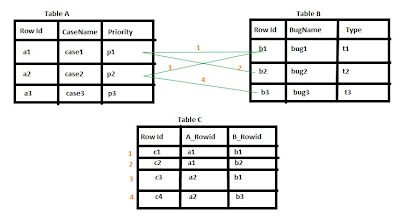
This post talks about how to create M:M relationship in Salesforce. Salesforce platform has a funny way of maintaining M:M relationship. In general, for many-to-many related objects, everybody would think, when we pick/ map data from one object, the system would create an association and maintain the relationship. But in case of standard page layouts, we will have to create the association link manually. We're gonna see how. Requirement: Cases may have multiple Bugs; Bugs may have multiple Cases. Solution: Create a junction Object. Cool thing to say, heh. But u wont find a junction object anywhere in your set up. Then how would you create it? Please do the steps from the following link, directly from salesforce. https://ap1.salesforce.com/help/doc/en/relationships_manytomany.htm The real thing behind the scenes is that, we are manually creating the record that holds the relationship. Let me put it this way for you. In general, the m:m relationship is dealt in the...

When Field Dependency In Visualforce Doesn’t Work!!!

Recently we have come across a strange issue. Requirement : Add two pick list fields, one is controlling field, another is dependent field. Solution: Simple, add two fields within <apex:inputfield> tag, we are done for. No, that doesn't work on a page with 2000 lines of code in between <apex:page> tags and lots of javascript. But, that works on simple page with the following structure. <apex:page id="page" >   <apex:form id="form01">           <apex:pageBlock id="block01" >                           <apex:pageMessages /> <apex:pageBlockSection id="sec01">                         <apex:inputField ……. />  // controlling field ...

OVERRIDE THE STANDARD BUTTON WITH PURE CONTROLLER

This post talks about how to override the standard buttons with pure controller or wizard pages, its a trick that I recently found. The requirement: When we hit the new button from Accounts/ Contacts/ Opportunities it should call same wizard.  Solution One: The Normal way is to create three wizards for overriding respective buttons, like, create a the wizard from the following link  " http://developer.force.com/cookbook/recipe/creating-a-wizard-with-visualforce-pages "  with small modifications, saying -- standardController="Account" extensions="newOpportunityController"  instead of custom controller. and the we would continue to create two more pages to override contacts and opportunities. the solutions looks good but we can save those two pages with this little tweak.  Solution Two: Step 1: Continue creating visualforce page 1 with standad controller and an extension, then go to accounts buttons and links and override the new button with the p...